Skip to content
AI Photos Prompts
Battle Royale2026 Tested Prompts

Free Fire AI Photo Editing Prompt 2026

With over a billion downloads, Garena Free Fire is a cultural powerhouse in mobile gaming. The iconic battle royale aesthetic — tactical combat vests, futuristic neon weapon skins, fiery Bermuda island airdrops, and swaggering survivor attitudes — is wildly popular for gaming profile pictures and YouTube thumbnails. These 2026 Free Fire AI prompts put you right in the center of the Booyah circle.

Copy-Paste AI Photo Prompts

Curated prompt styles with explicit face-preservation commands and realistic camera optics.

01Midjourney v6.1 / Gemini
Battle Royale Gaming

Elite Bermuda Battle Royale Survivor Portrait

An action-ready battle royale survivor standing amidst the rubble of Bermuda island, holding an assault rifle with red airdrop smoke billowing behind.
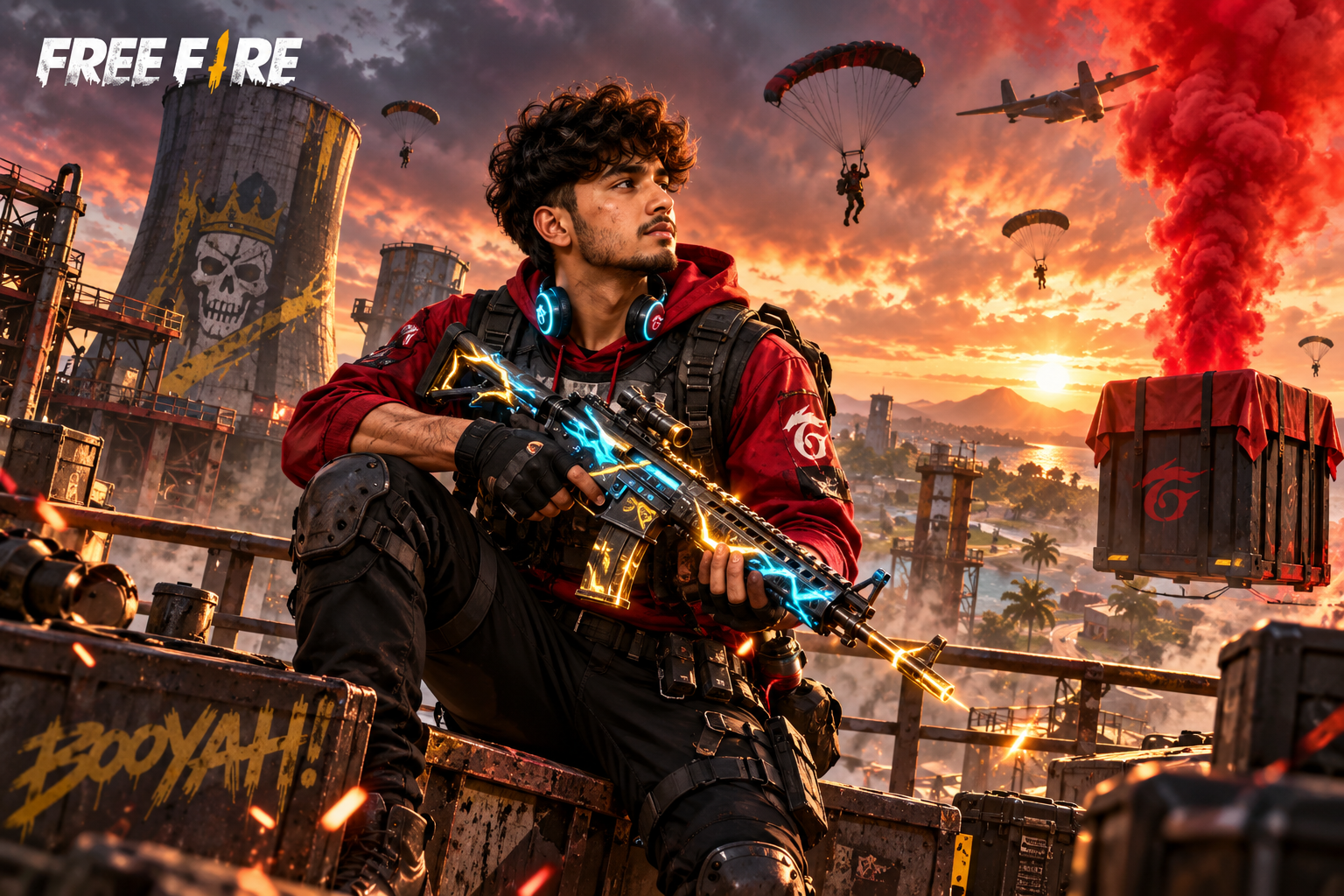
Elite Bermuda Battle Royale Survivor Portrait
AI Reference Output
Prompt Command110 words

Action gaming concept art of the subject as an elite Garena Free Fire battle royale survivor on the Bermuda map. Dressed in tactical urban combat gear: black tactical vest over a crimson hoodie, fingerless combat gloves, utility thigh holsters, and a subtle glowing holographic ear headset. Holding a high-tech assault rifle with glowing cyan and gold skin accents. In the background, an industrial factory rooftop with red smoke billowing from a supply airdrop crate under an intense orange storm sky. Dynamic cinematic lighting, subtle dirt smudges on cheek, sharp intense gaze, 50mm f/1.8 lens, hyper-realistic video game key art, strict preservation of facial bone structure and likeness from reference photograph.

Face preservation instructions included

What Are Free Fire AI Photo Editing Prompt 2026?

These prompts instruct AI to render high-octane gaming character models: tactical combat gloves, glowing weapon skins, military cargo pants, and Bermuda map drop zones with red airdrop smoke.

Why Free Fire AI Photo Editing Prompt 2026 Are Trending

Huge Gaming Community

Millions of Free Fire players love using personalized survivor avatars for their guild profiles and streaming channels.

Popular Styles You Can Create

  • Bermuda Peak Drop Zone: Holding a glowing futuristic assault rifle with red airdrop smoke in the background.

  • Cyberpunk Battle Pass Skin: Glowing neon combat armor with holographic visor.

How to Use These AI Prompts

1

Copy prompt, upload photo to Gemini or Leonardo, and generate your battle royale survivor.

Which AI Tool Delivers the Best Results?

Comparison of realism, speed, and free tier accessibility across top image models.

AI PlatformFree AccessRealism LevelBest Suited For
Google GeminiPopular
Yes (Generous)HighClean ambient lighting, Indian ethnic attire, quick prompt copy-paste, natural faces
Leonardo AITop Realism
Yes (Daily credits)Very HighPhotorealistic skin textures, accurate jewelry details, face preservation matching
ChatGPT (DALL·E 3)Versatile
Limited / PlusHighConversational prompt refinement, intricate composition instructions, fast turnaround
Midjourney v6.1Studio Grade
Paid (Subscription)OutstandingCinematic magazine aesthetics, dramatic bokeh, royal ethnic portraits, fine art lighting

Common Issues and Quick Fixes

Fine-tune your output by appending these targeted prompt clauses.

Issue EncounteredHow to Resolve It (Prompt Modifier)
Weapons look warped or non-functionalSpecify: 'ergonomic futuristic assault rifle with sharp mechanical details and glowing neon LED trim'.

Frequently Asked Questions About Free Fire AI Photo Editing Prompt 2026

Everything you need to know about generating culturally authentic AI portraits.

Can I use this for my YouTube gaming thumbnail?

Yes. Generate at 16:9, keep the character to one side, and leave the opposite third clear for your title text. The Bermuda map background and neon skin details stay sharp when the thumbnail is scaled down by YouTube.

How do I use Free Fire AI Photo Editing Prompt in Google Gemini?

Copy the prompt from this page, open Google Gemini on the web or in the mobile app, upload a clear front-facing photo of yourself, then paste the text exactly as written and press generate. Gemini normally renders Free Fire AI Photo Editing Prompt in five to ten seconds. If the face drifts from your reference photo, upload a sharper image taken in even natural light and generate again instead of rewriting the prompt.

Which AI photo tools work best with Free Fire AI Photo Editing Prompt?

Google Gemini is the best free option and the first tool these prompts are tested on. Midjourney produces the most cinematic light and depth of field, Leonardo AI holds facial likeness most consistently across several runs, and ChatGPT with DALL-E 3 handles group and family scenes best. The text here is plain descriptive prose, so it works in all four without any syntax changes.

How do I keep my real face in these Free Fire AI Photo Editing Prompt photos?

Every prompt on this site ends with an identity clause instructing the model to preserve your facial geometry, bone structure, skin tone, and eye shape from the uploaded reference. Pair it with a high-resolution, front-facing photo in flat natural light, no beauty filter and no heavy makeup smoothing, and avoid side profiles, so Free Fire AI Photo Editing Prompt renders as you rather than as a generic model.

How many prompts are in this Free Fire AI Photo Editing Prompt collection?

This page contains 1 tested prompt style. Each one ships as its own card with a sample image and a one-click copy button, and every card includes the full scene description, the authentic clothing and lighting detail, the face preservation clause, and practical photo tips for the reference shot.

Conclusion

Claim the ultimate Booyah! Generate your elite Free Fire character art today.